书接上回,上篇我记录了如何使用 Cloudflare R2 + Pages 搭建免费图床,并将其集成到 WordPress 评论系统 中。本文将继续分享我为 WordPress 评论功能增加 排序、点赞、前台删除与编辑 的实现过程和相关代码。
之所以折腾这些功能,主要是为了能在前台更高效地管理评论。比如点赞功能,其实核心目的也是为了更好地参与排序,目前我设置的是“按点赞量自动排序”,让互动更直观。
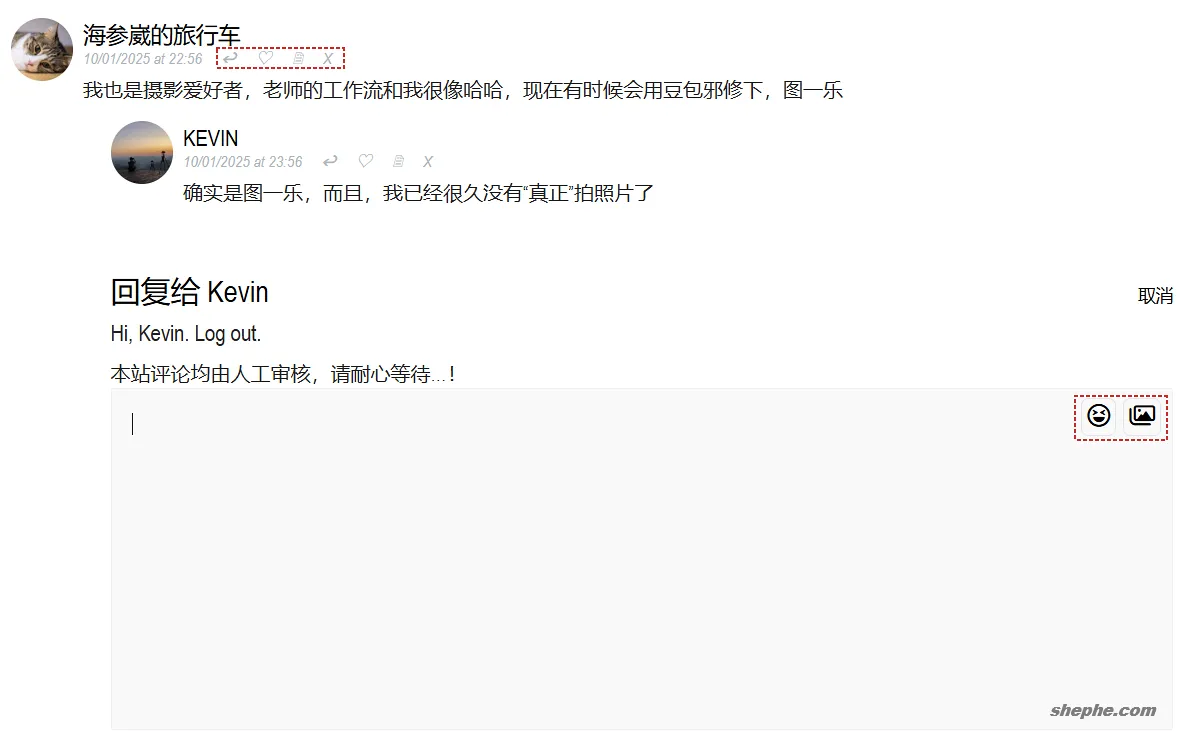
考虑到每个主题都不一样,所以我就只分享一下我的思路,具体的可以参考以下代码:
/**
 * =========================
 * WordPress 评论系统增强版
 * 支持点赞、排序、缓存、访客、删除
 * 版本:2025.10.13 优化性能版
 * =========================
 */

// 获取评论点赞数(带缓存)
function get_comment_likes($comment_id) {
    static $cache = [];
    if (isset($cache[$comment_id])) return $cache[$comment_id];
    $likes = get_comment_meta($comment_id, '_like_count', true);
    return $cache[$comment_id] = ($likes ? intval($likes) : 0);
}

/**
 * AJAX 点赞 / 取消赞
 */
function handle_comment_like() {
    if (empty($_POST['comment_id']) || !is_numeric($_POST['comment_id'])) {
        wp_send_json_error('Invalid request');
    }

    $comment_id = intval($_POST['comment_id']);
    $likes = get_comment_likes($comment_id);
    $cookie_name = 'comment_like_' . $comment_id;

    if (isset($_COOKIE[$cookie_name]) && $_COOKIE[$cookie_name] === '1') {
        // 取消点赞
        $likes = max(0, $likes - 1);
        update_comment_meta($comment_id, '_like_count', $likes);
        setcookie($cookie_name, '', time() - 3600, '/');
        $liked = false;
    } else {
        // 点赞
        $likes++;
        update_comment_meta($comment_id, '_like_count', $likes);
        setcookie($cookie_name, '1', time() + (365 * DAY_IN_SECONDS), '/');
        $liked = true;
    }

    // 清理缓存(HTML + 排序缓存)
    if ($comment_obj = get_comment($comment_id)) {
        $post_id = $comment_obj->comment_post_ID;
        wp_cache_delete("comments_html_{$post_id}", 'comments');
        wp_cache_delete("comment_thread_order_{$post_id}", 'comments');
    }

    wp_send_json_success([
        'liked' => $liked,
        'likes' => $likes
    ]);
}
add_action('wp_ajax_handle_comment_like', 'handle_comment_like');
add_action('wp_ajax_nopriv_handle_comment_like', 'handle_comment_like');

/**
 * AJAX 删除评论(仅用户ID=1)
 */
function handle_comment_delete() {
    if (!isset($_POST['comment_id']) || !is_numeric($_POST['comment_id'])) {
        wp_send_json_error(['message' => '无效的评论 ID']);
    }

    $comment_id = intval($_POST['comment_id']);
    $comment = get_comment($comment_id);
    if ($comment) {
        wp_trash_comment($comment_id);
        wp_send_json_success();
    }
    wp_send_json_error(['message' => '评论不存在']);
}
add_action('wp_ajax_delete_comment', 'handle_comment_delete');

/**
 * 评论排序:按评论树中最大点赞数排序顶层评论
 * - 子评论内部顺序不变
 * - 性能优化:批量预热 commentmeta,结果缓存 1 小时
 */
add_filter('comments_array', function ($comments, $post_id) {
    if (!is_singular() || is_admin() || empty($comments)) return $comments;

    // 尝试读排序缓存
    $order_key = "comment_thread_order_{$post_id}";
    if ($cached_ids = wp_cache_get($order_key, 'comments')) {
        $map = [];
        foreach ($comments as $c) $map[$c->comment_ID] = $c;
        $sorted = [];
        foreach ($cached_ids as $cid) {
            if (isset($map[$cid])) $sorted[] = $map[$cid];
        }
        if (count($sorted) === count($comments)) return $sorted;
    }

    // 预热 meta 缓存
    $ids = wp_list_pluck($comments, 'comment_ID');
    update_meta_cache('comment', $ids);

    // 构建 parent=>children 映射
    $children_map = [];
    foreach ($comments as $c) {
        $pid = (int)$c->comment_parent;
        $children_map[$pid][] = $c;
    }

    // 计算树最大点赞数(缓存递归)
    $max_cache = [];
    $get_max_like = function ($id) use (&$children_map, &$get_max_like, &$max_cache) {
        if (isset($max_cache[$id])) return $max_cache[$id];
        $max = get_comment_likes($id);
        if (!empty($children_map[$id])) {
            foreach ($children_map[$id] as $child) {
                $m = $get_max_like($child->comment_ID);
                if ($m > $max) $max = $m;
            }
        }
        return $max_cache[$id] = $max;
    };

    // 排序顶层评论
    if (!empty($children_map[0])) {
        usort($children_map[0], function ($a, $b) use ($get_max_like) {
            $ma = $get_max_like($a->comment_ID);
            $mb = $get_max_like($b->comment_ID);
            if ($ma === $mb) {
                return strtotime($b->comment_date_gmt) <=> strtotime($a->comment_date_gmt);
            }
            return $mb <=> $ma; // 最大点赞数高的在前
        });
    }

    // 展平
    $sorted = [];
    $flatten = function ($node) use (&$flatten, &$children_map, &$sorted) {
        $sorted[] = $node;
        if (!empty($children_map[$node->comment_ID])) {
            foreach ($children_map[$node->comment_ID] as $child) $flatten($child);
        }
    };
    foreach ($children_map[0] ?? [] as $root) $flatten($root);

    // 缓存 ID 顺序
    wp_cache_set($order_key, wp_list_pluck($sorted, 'comment_ID'), 'comments', HOUR_IN_SECONDS);
    return $sorted;
}, 10, 2);

/**
 * 评论显示模板:增加点赞按钮、回复 title
 */
function impeka_grve_comments($comment, $args, $depth) {
    $current_user_id = $args['current_user_id'];
    $comment_id = get_comment_ID();
    $likes = get_comment_likes($comment_id);
    $liked = isset($_COOKIE['comment_like_' . $comment_id]) && $_COOKIE['comment_like_' . $comment_id] === '1';
    $title_text = $liked ? "点错了?取消赞...💔" : "当前 {$likes} 赞,点个赞吧...💕";
    ?>
    <li class="grve-comment-item">
        <div id="comment-<?php echo $comment_id; ?>" <?php comment_class(); ?>>
            <div class="grve-comment-inner">
                <div class="grve-author-image"><?php echo get_avatar($comment, 50); ?></div>
                <div class="grve-comment-content">
                    <div class="grve-title-wrapper">
                        <span class="grve-title grve-text-heading grve-h6">
                            <?php printf(__('%s'), get_comment_author_link()); ?>
                        </span>
                        <div class="grve-comment-meta grve-small-text">
                            <?php printf('%1$s at %2$s', get_comment_date(), get_comment_time()); ?>
                            <?php comment_reply_link(array_merge($args, [
                                'depth' => $depth,
                                'max_depth' => $args['max_depth'],
                                'reply_text' => '<span title="回复">↩</span>'
                            ])); ?>

                            <!-- 点赞 -->
                            <a href="#" class="comment-like-btn" data-comment-id="<?php echo $comment_id; ?>" title="<?php echo esc_attr($title_text); ?>">
                                <span class="grve-comment-edit like-icon"><?php echo $liked ? '❤' : '♡'; ?></span>
                            </a>

                            <?php edit_comment_link('🗎', ' ', ''); ?>
                            <?php if ($current_user_id == 1) : ?>
                                <a href="#" class="grve-comment-edit delete-comment" data-comment-id="<?php echo $comment_id; ?>">X</a>
                            <?php endif; ?>
                        </div>
                    </div>
                    <?php if ($comment->comment_approved == '0') : ?>
                        <p><?php esc_html_e('Your comment is awaiting moderation.', 'impeka'); ?></p>
                    <?php endif; ?>
                    <div class="grve-comment-text"><?php comment_text(); ?></div>
                </div>
            </div>
        </div>
    </li>
    <?php
}
这段代码为 WordPress 评论系统增加了点赞、排序、缓存、访客操作和前台删除等功能。get_comment_likes() 用于获取并缓存点赞数,handle_comment_like() 通过 AJAX 处理点赞与取消点赞逻辑,并根据 cookie 判断用户是否已点赞。每次点赞变化后会同步更新数据库,并清除缓存,确保页面数据实时更新。
在评论排序部分,代码通过 comments_array 钩子重新排序评论。它计算每个评论树中最高的点赞数,并按点赞量对顶层评论排序,让高互动评论排在前面。排序结果会缓存一小时以提升性能。最后,impeka_grve_comments() 定义了评论的前端显示模板,增加了点赞按钮、删除操作(仅限管理员)和交互提示,让评论区更直观、可操作性更强。
以下 JS 代码已被添加到我的核心脚本中,包括了上篇文章实现图片上传的部分:
/**
 * ==============================
 * WordPress 评论前端交互脚本
 * 功能:评论框工具栏、懒加载增强、点赞与删除
 * 版本:2025.10.13
 * ==============================
 */

document.addEventListener("DOMContentLoaded", function () {
    const commentBox = document.querySelector("#comment");
    const toolbar = document.querySelector("#comment-toolbar");
    if (!commentBox || !toolbar) return;

    // 当评论框获得焦点时显示工具栏
    commentBox.addEventListener("focus", () => toolbar.classList.add("active"));

    // 阻止鼠标在工具栏上引发失焦
    toolbar.addEventListener("mousedown", (e) => e.preventDefault());

    // 当评论框失去焦点且内容为空时隐藏工具栏
    commentBox.addEventListener("blur", () => {
        if (!commentBox.value.trim()) toolbar.classList.remove("active");
    });
});

// 动态加载评论增强脚本(仅在首次点击时加载)
let enhancerLoaded = false;
['#emoji-btn', '#img-btn'].forEach((sel) => {
    const btn = document.querySelector(sel);
    if (!btn) return;

    btn.addEventListener("click", async () => {
        if (!enhancerLoaded) {
            enhancerLoaded = true;
            // 懒加载 comment-enhancer.js 模块
            const { default: initCommentEnhancer } = await import(
                '/wp-content/themes/impeka/js/comment-enhancer.js'
            );
            initCommentEnhancer();
            btn.click(); // 再次触发原始点击事件
        }
    });
});

jQuery(document).ready(function ($) {

    // 删除评论(仅限管理员)
    $('.delete-comment').click(function (e) {
        e.preventDefault();
        const commentId = $(this).data('comment-id');

        $.post(ajax_obj.admin_url, {
            action: 'delete_comment',
            comment_id: commentId
        }, function (response) {
            if (response.success) {
                $('#comment-' + commentId).fadeOut();
            } else {
                alert('删除失败:' + response.data.message);
            }
        });
    });

    // 点赞 / 取消点赞
    $('.comment-like-btn').click(function (e) {
        e.preventDefault();
        const btn = $(this);
        const commentId = btn.data('comment-id');

        $.post(ajax_obj.admin_url, {
            action: 'handle_comment_like',
            comment_id: commentId
        }, function (response) {
            if (response.success) {
                const icon = btn.find('.like-icon');
                icon.text(response.data.liked ? '❤' : '♡');
                btn.attr(
                    'title',
                    response.data.liked
                        ? '点错了?取消赞...💔'
                        : '当前 ' + response.data.likes + ' 赞,点个赞吧...💕'
                );
            } else {
                alert('操作失败,请稍后重试。');
            }
        }, 'json');
    });
});- 交互逻辑:
当用户聚焦评论框时自动显示工具栏;点击 emoji 或图片按钮时,会懒加载额外增强模块;前台点击“赞”或“删除”按钮时,通过 AJAX 请求与后端交互,实现无刷新更新评论状态。 - 设计思路:
整体脚本追求轻量与响应性,核心交互均在前端完成,后台只负责状态变更与权限验证。通过懒加载、缓存和异步更新,实现了更快加载、更平滑操作体验。


越来越强大了,赞一个。。。